Know where every job stands before you open it.
OzTrady is job, task and stock software for plumbing, electrical, roofing, HVAC and landscaping businesses. Managers see what is done, what is stuck and who has it. Crews get a phone app that stays out of the way.
A percentage bar tells you nothing about what to do next.
Every job card in OzTrady splits its bar by task state: done, in progress, blocked and still to do. A red edge appears the moment something is blocked or overdue.
Under the bar, the tasks that need you come first: blocked, overdue, then anything nobody has been given yet. Most days you will not need to open the job at all.
Built for how a trades business runs
Quotes, invoices and money
Quotes sent by email or WhatsApp and accepted online on your own letterhead, deposits and progress claims, invoices, payments and the profit on every job.
More about it →Jobs, workflows and scheduling
Every job starts from your workflow, with its steps, tasks, people and due dates filled in. See everyone’s day and week, set the order each person attends their jobs, and drag a job to move it.
More about it →Customers and updates
Customers and their people in one place, and updates that send themselves as the job moves.
More about it →Crew app, check-in and timesheets
One app in your colours: today’s work, check-in on site with arrive and leave alerts, photos, materials and timesheets.
More about it →Stock and buying
Supplier prices, purchase orders your suppliers confirm online, deliveries and bills, with every cost landing on the right job.
More about it →Team, access and records
Employment details, licences and tickets, roles and access, and a history of every change.
More about it →See it in action
Real screens from OzTrady, with a sample plumbing business. Your business gets its own name, logo and colours.
Where the money is
Quotes waiting for the customer, jobs finished but not invoiced, invoices overdue and goods on order, each with its total. Owners see this month’s invoiced, paid and owed beside last month.
See it full size ↗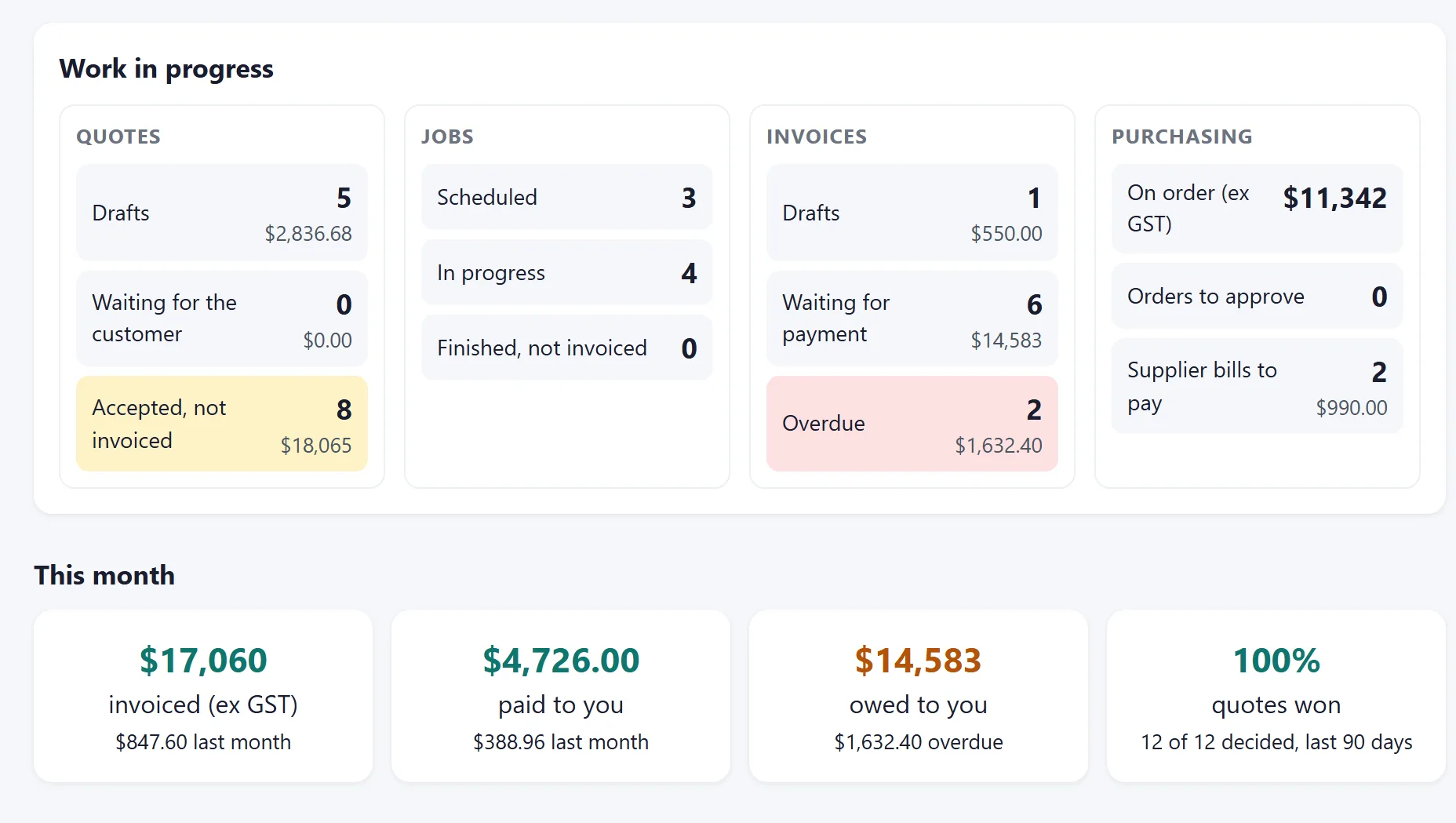
Your letterhead on every quote
Quotes, invoices and purchase orders carry your logo, your colour and your details, as a PDF and on the page your customer opens. Choose where the logo sits, what a quote is called, a footer for every page and a payment slip on invoices.
See it full size ↗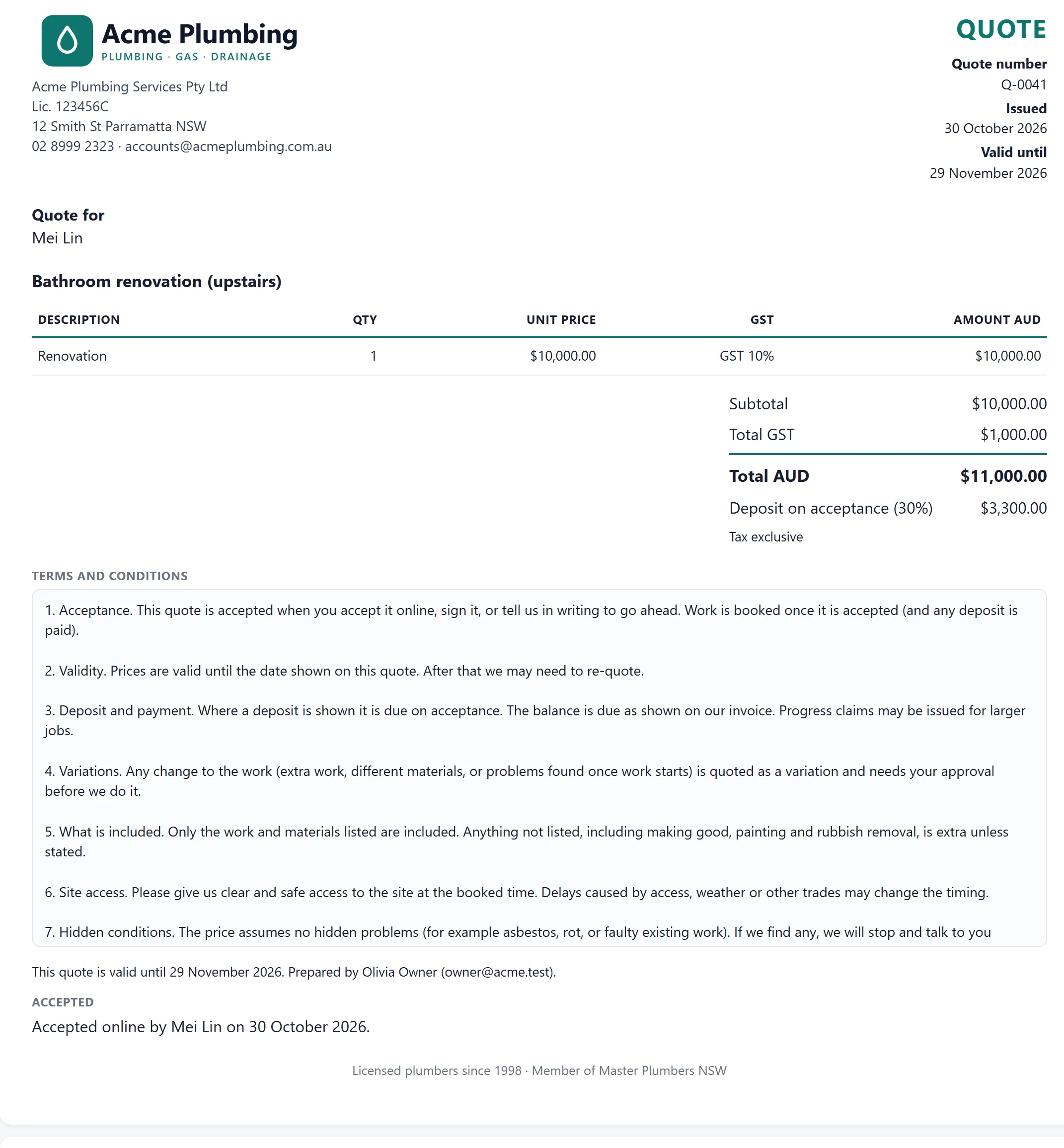
The jobs board
Every job shows its number, who the customer is and who to call, what is done, what is blocked and what is overdue, and who has each task. The problems sit at the top of each card, so most days you do not need to open the job.
See it full size ↗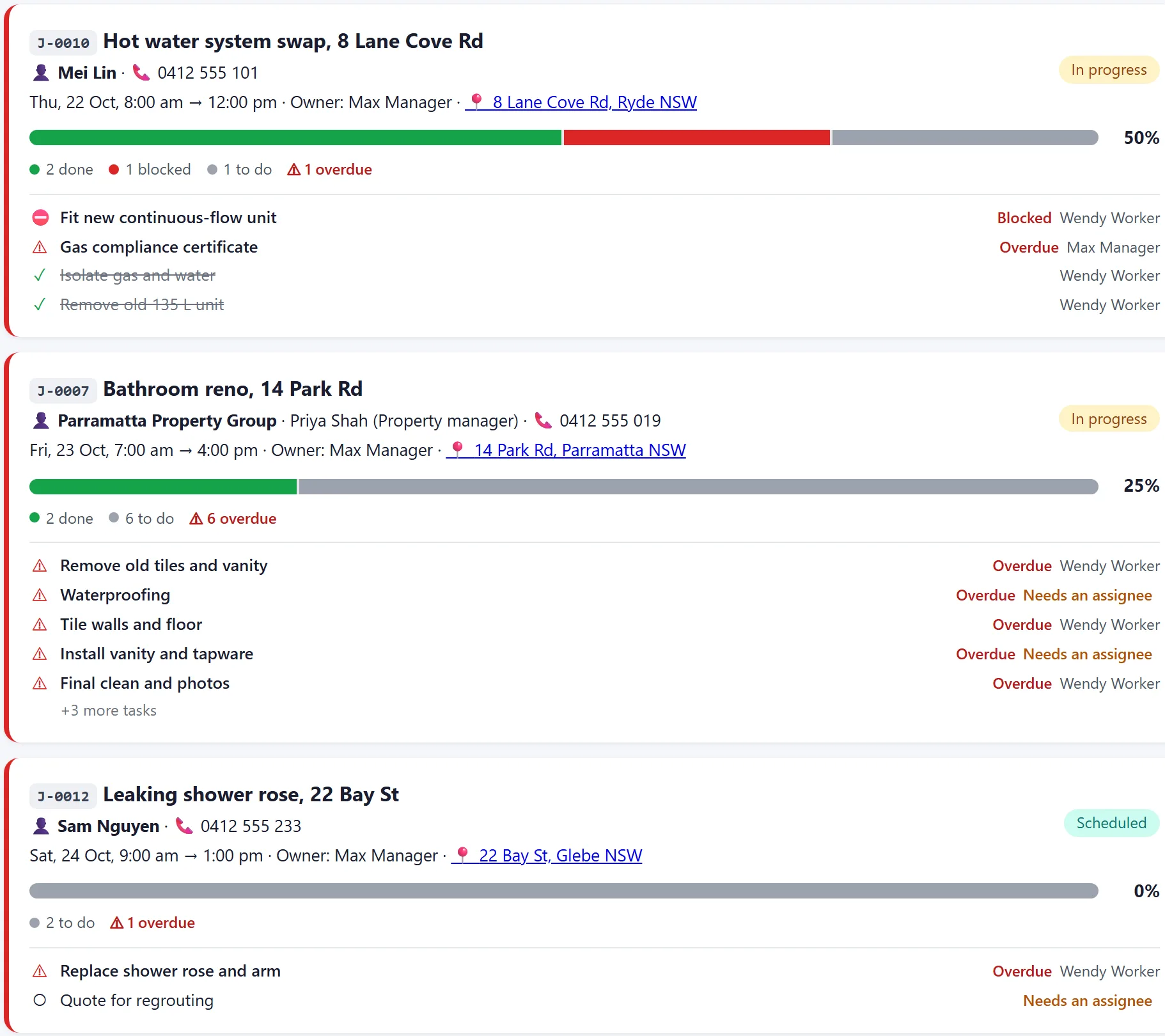
Everyone’s day at a glance
A row for each person, with the jobs they run and their tasks on the days they are due, drawn where they sit in the day or week. Each person’s stops are numbered in the order they will attend them, and a manager can set that order. Drag a job to another time, day or person: you see what changes before you confirm, and the people on it are told.
See it full size ↗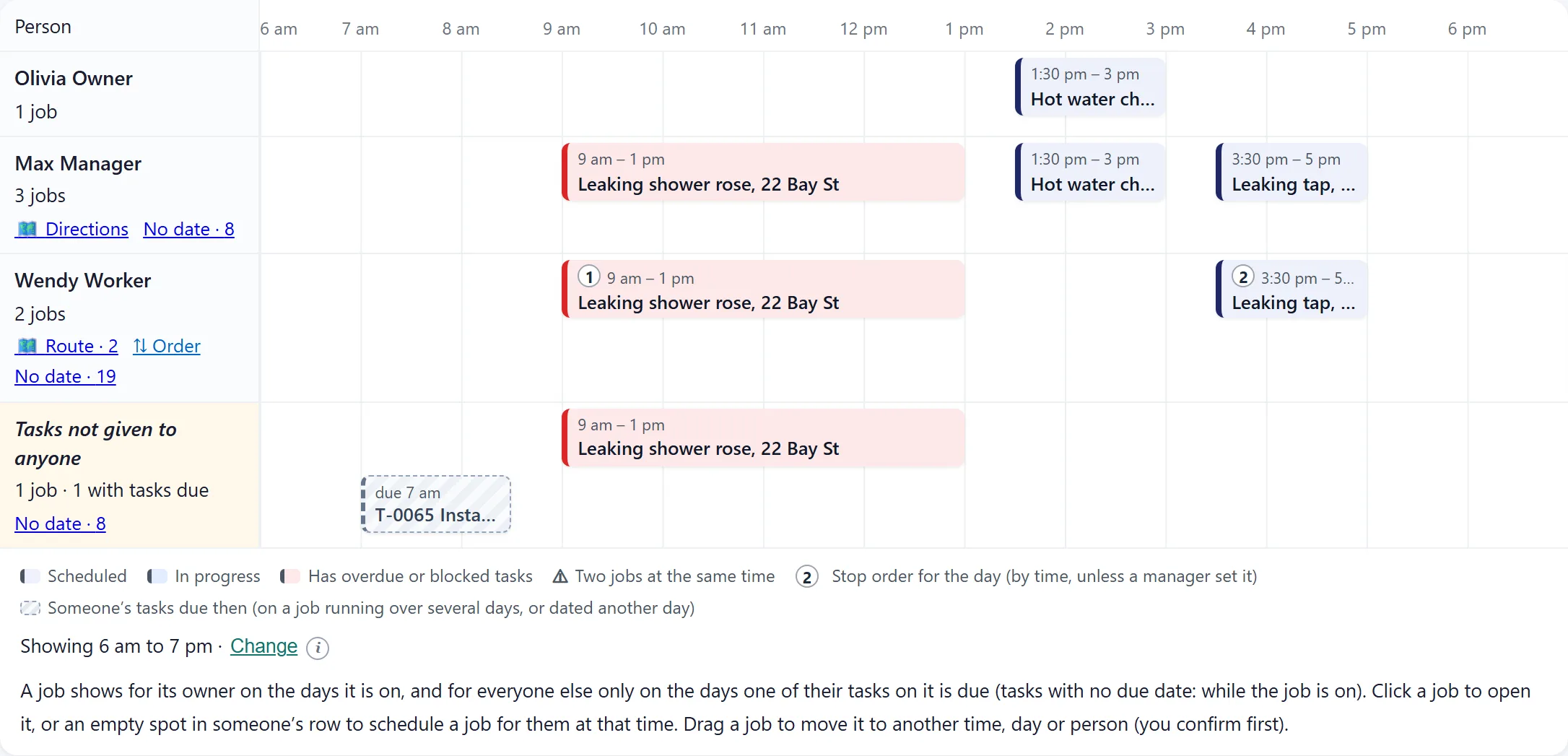
Schedule a job from a workflow
Pick a workflow and every task arrives grouped by step, with the usual person and a due date already filled in. Change anyone, or leave a task to assign later.
See it full size ↗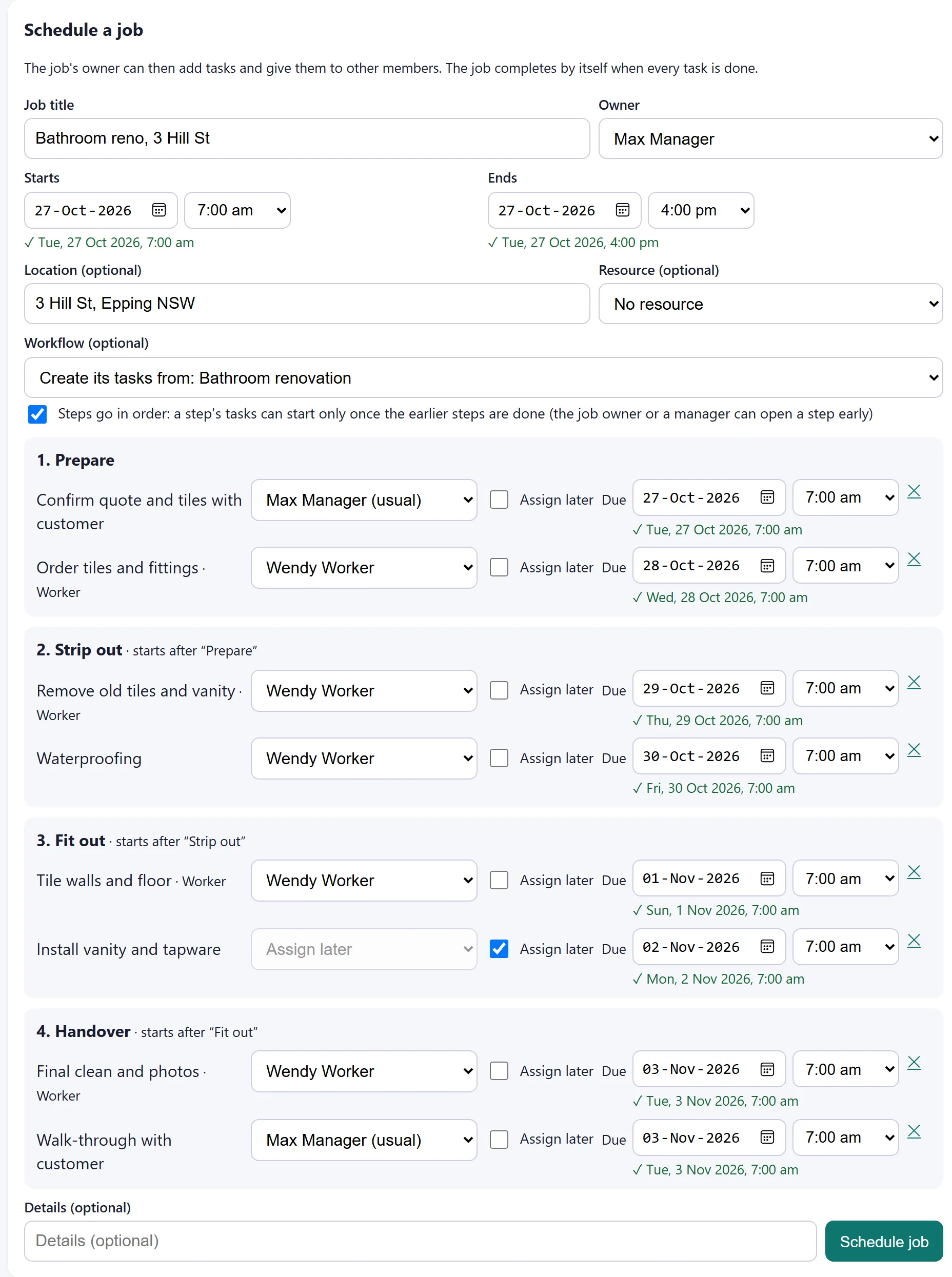
Steps in the right order
Later steps wait until the earlier ones are done, and the crew is told when they can start. The job owner or a manager can open a step early when it makes sense. Each task has its own number, the team keeps notes on the job where everyone sees them, and the money and customer fold to one line until you need them.
See it full size ↗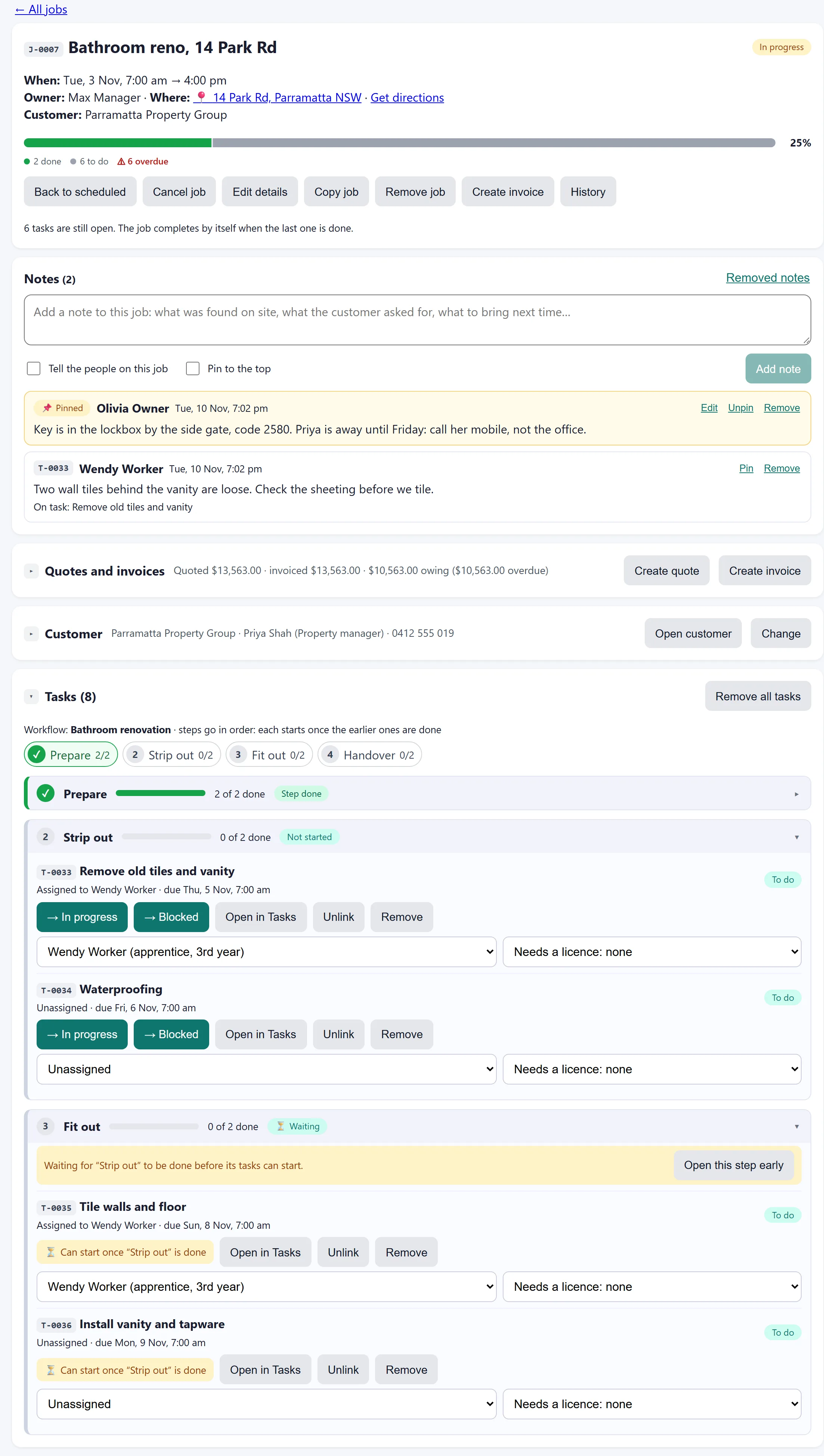
Big jobs, one tidy list
A house build can have 200 tasks. The job’s task list shows them as a table grouped by step, with finished steps folded away: change a status or who has it right there, drag tasks into order or into another step, set start and due dates, tick a group of tasks to hand them over or move their dates at once, and find any task by name, number or person.
See it full size ↗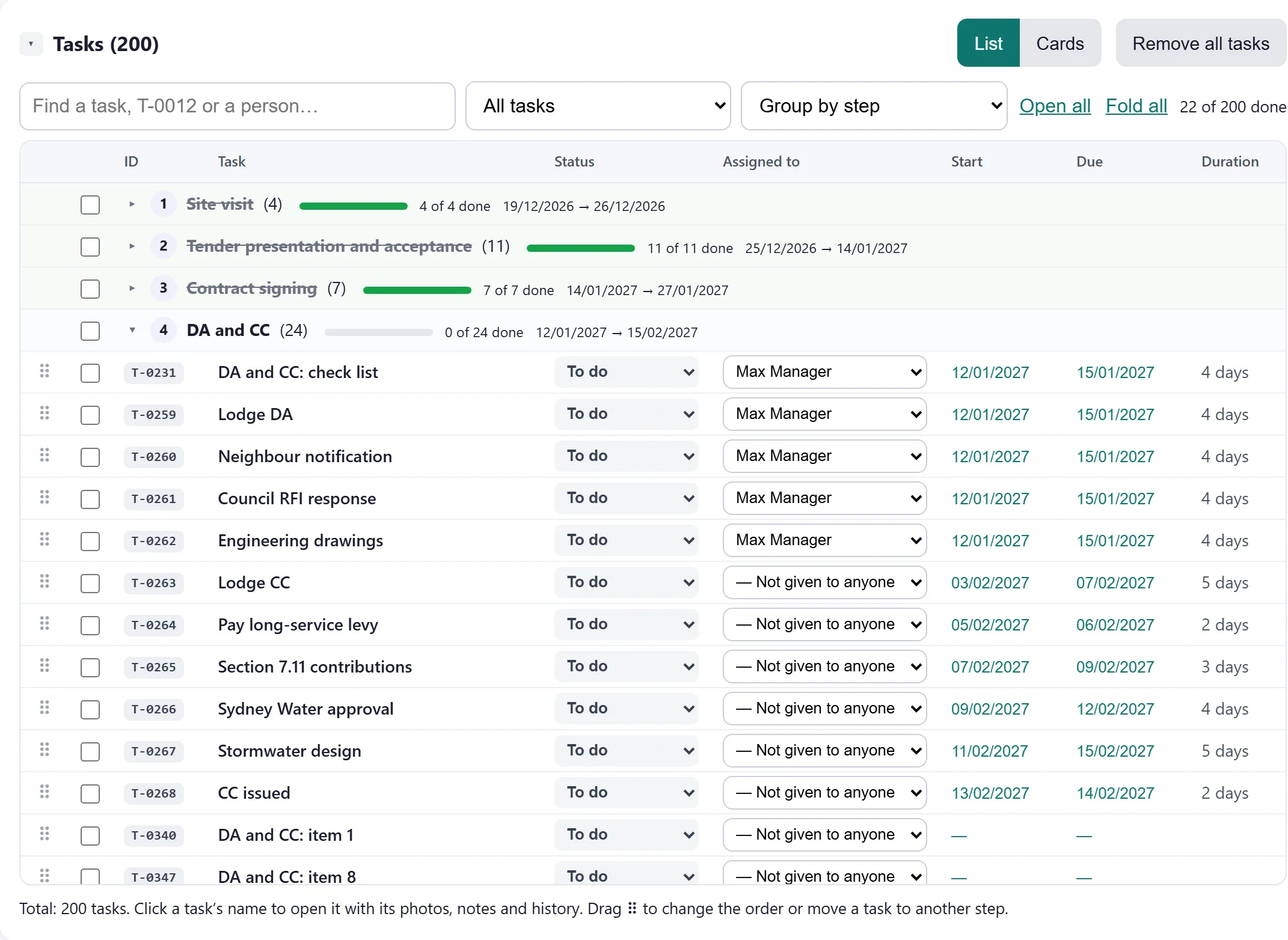
Updates that send themselves
Each step can tell the right people when it starts or is finished, and send the customer an update by email or WhatsApp in your own words. Write it once in the workflow and every job keeps everyone in the loop.
See it full size ↗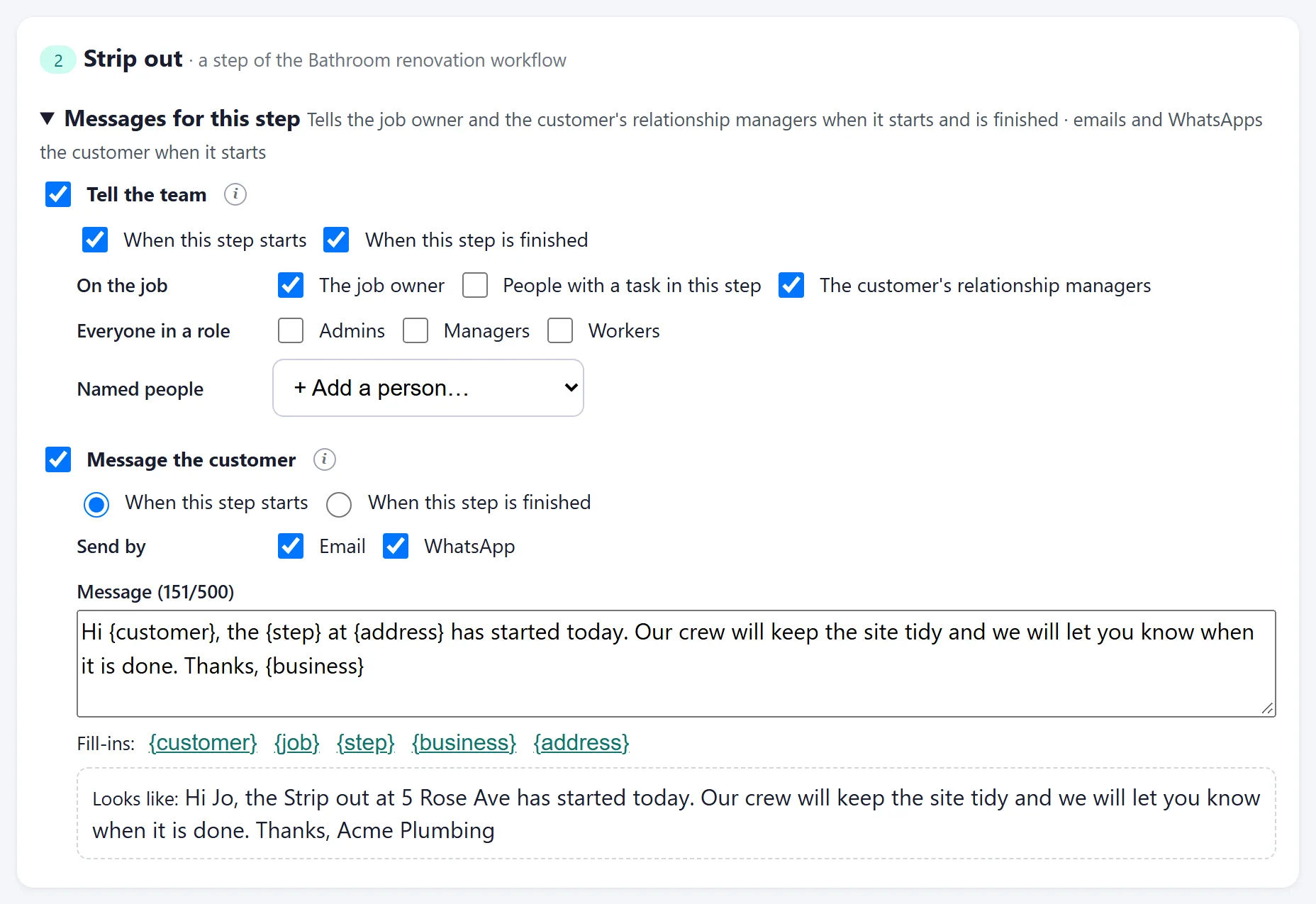
The crew’s phone app
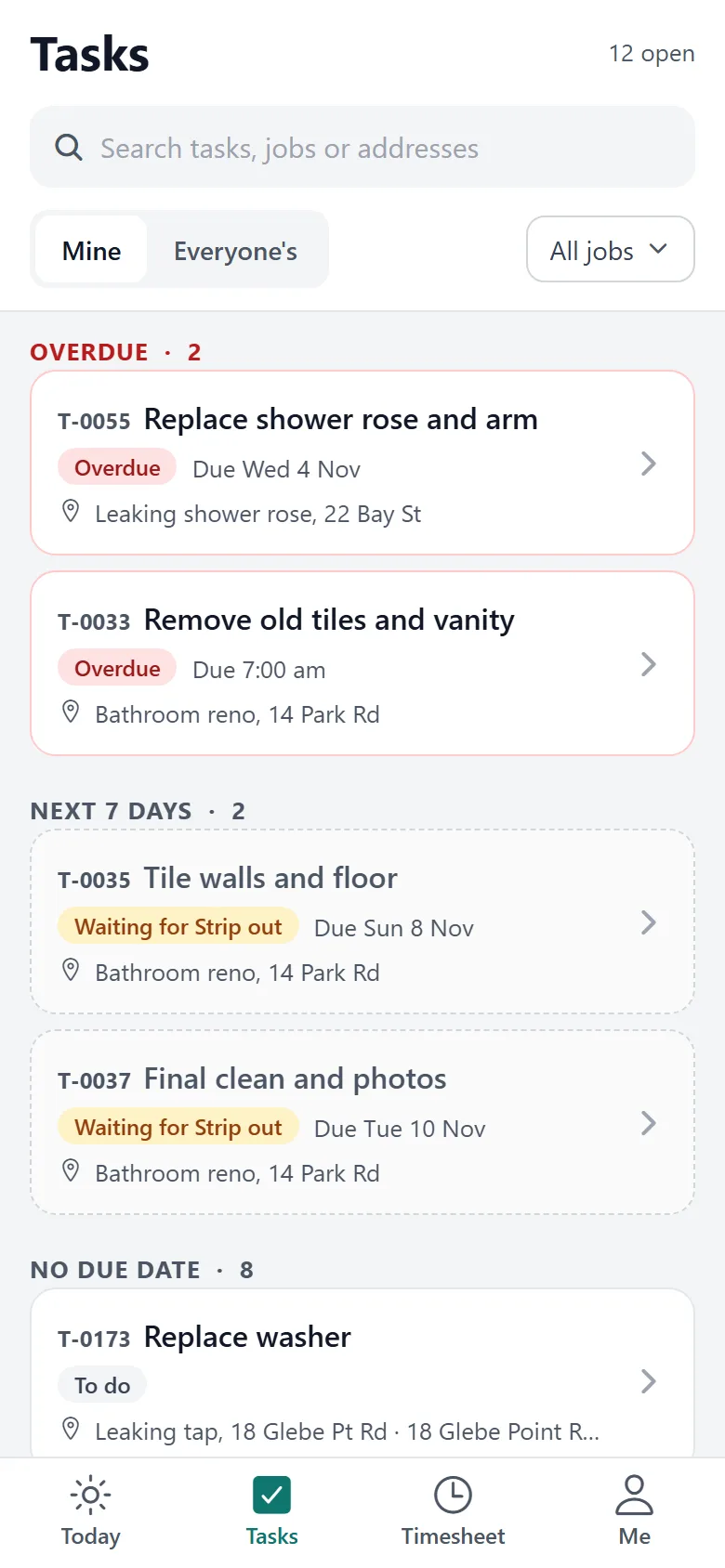
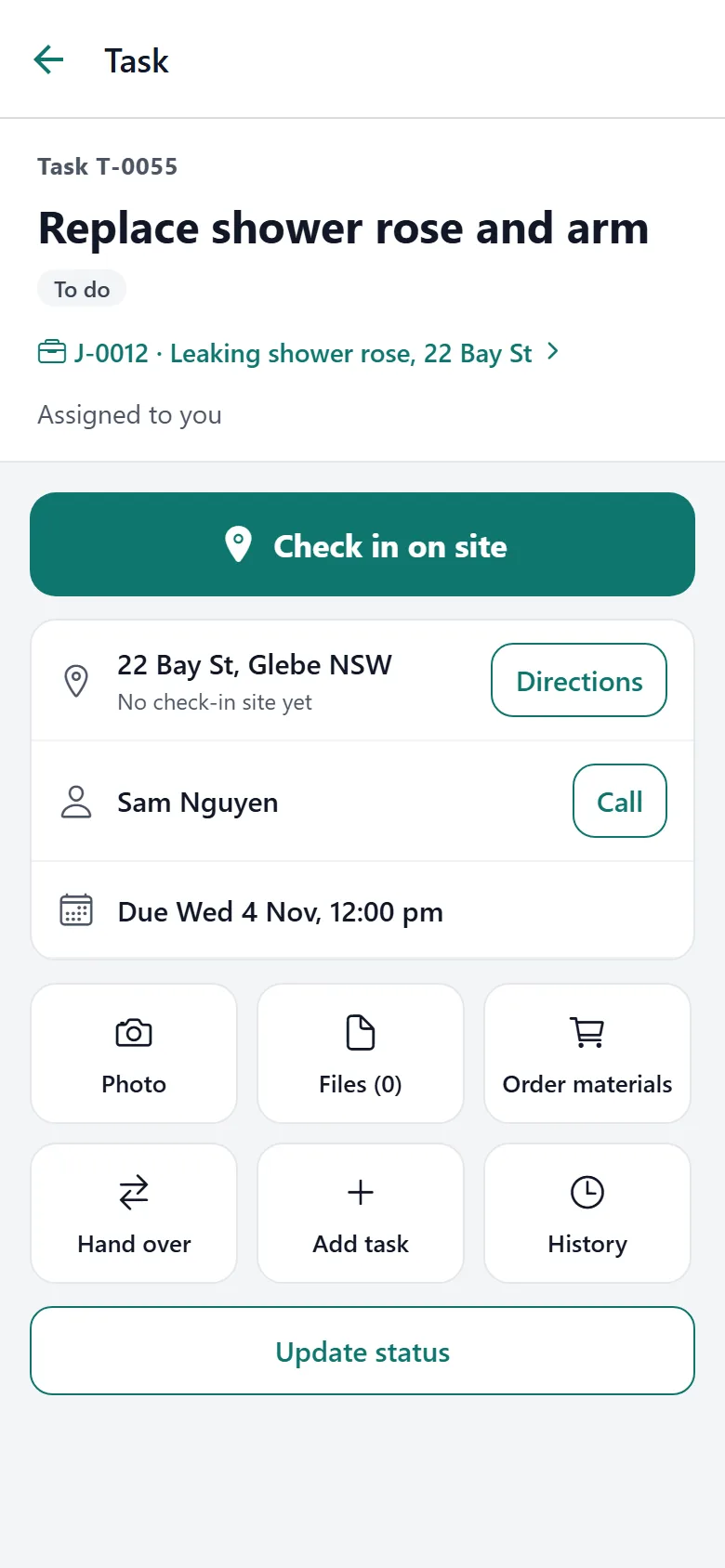
Each person sees their own work by when it is due. Open a task to check in on site, get directions, call the customer, take a photo or order materials, all with one hand. With arrive and leave alerts on, the phone reminds them to check in when they reach the site, or checks them in and out by itself.
Up and running without a project
We set up your business
You get your own address, such as yourbusiness.oztrady.com.au, with your name, logo and colours on it, and your own icon in the browser tab.
Invite your team
Everyone gets an email to choose a password. Set up your workflows: the steps your jobs go through, the tasks in each step and who usually does them, so they match how your trade works.
Run your first job
Create a job from a workflow (or add its tasks yourself), check who does what, and watch the bar fill in as the crew works. Install the phone app when you are ready.
Made for the trades
Plumbing
Callouts, parts orders and sign-off photos, with blocked jobs that stand out.
Electrical
Test and sign-off steps on every job, with a record of who did what.
Roofing
Multi-stage jobs, crew changes between stages and materials used on each.
HVAC
Install and service workflows, plus the equipment and vehicles on each job.
Landscaping
Crews spread across sites, with stock and tasks tracked for each one.
General trades
Start with the simple workflow and add steps as the business grows.
Run it under your own name
Franchise groups and industry bodies can put their own name, logo, colours and web address on OzTrady and set up businesses under it.
Each business only ever sees its own data. A small “Powered by OzTrady” always stays in the footer.
See it with your own jobs
Tell us about your team and what slips through the cracks today. We will set up a trial business and show you the same thing with your work in it.